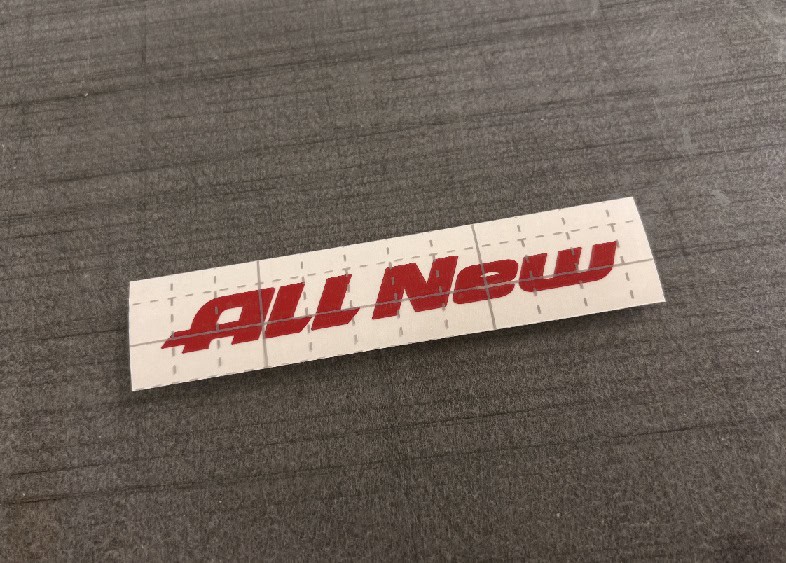
Want to give your new vehicle a subtle emblem overlay decal with an OEM-style sporty accent?
This free ALL NEW car decal vector template is specially designed as a subtle emblem accent. Positioned directly above or beside your factory trunk badge, this clean automotive typography decal gives any car a fresh showroom badge look.
Download the free vector files below for personal, non-commercial use and create a high-contrast vinyl decal with your plotter or CNC cutter!
I originally created this design as a small accent to place above the emblem on my own car. I made several of them in a small size and ended up giving some away to friends and people I met at local car-and-coffee gatherings.
I really liked how the red lettering added a simple pop of color to an otherwise plain factory emblem. Because the design is small and subtle, it doesn’t feel too flashy or overwhelming, which makes it an easy way to give the original badge a slightly different look.
If you have access to a small laser cutter, another option is to cut the “ALL NEW” lettering from red acrylic and attach it above or around the emblem. It can give the design a slightly more dimensional look than vinyl. Feel free to use the vector in whichever way works best for your project and experiment with the size, material, and placement.
1. What Is the “ALL NEW” Decal Design?
The ALL NEW decal template features clean, OEM-style block typography crafted for automotive badging.
Unlike large vehicle wraps or aggressive racing graphics, this decal is designed to act as a subtle visual accent. Placed near factory emblems, it mimics special trim packages or new-generation model badges seen in auto showrooms.
🚘 Ideal Placement Areas:
- Primary Spot: Directly above or beside factory rear trunk emblems
- Front & Rear: Front grille badges, hatch panels, and tailgate logos
- Exterior Panels: Side quarter windows and fender trim accent areas

2. Recommended Styling: Small Size & Red Vinyl
To achieve a factory-installed aesthetic rather than an overwhelming aftermarket look, we strongly recommend two key styling guidelines:
- Keep It Small: The decal should complement—not overpower—your original vehicle emblem. A subtle 2 to 4-inch width looks cleaner and more natural.
- Use Red Automotive Vinyl: A red vinyl decal offers high visual contrast against dark, silver, or white paint finishes, adding a dynamic, sporty accent akin to performance trim badges (e.g., Type R, GT-Line, Sport).
3. How to Make Your Own Vinyl Decal (Step-by-Step)
Creating a precision decal using our free vector files is straightforward:
- Select Premium Exterior Vinyl: Choose outdoor-rated permanent cast vinyl (e.g., Oracal 651/751 in High-Gloss Red) for long-term UV and car wash resistance.
- Import the Vector File: Load the
.SVG,.DXF, or.AIfile into your cutting software (Cricut Design Space, Silhouette Studio, Roland CutStudio, etc.). - Scale to Match Emblem: Measure your factory badge and scale the text so it matches the visual center and width of the emblem.
- Make a Test Cut: Run a small test cut on scrap vinyl to dial in blade depth, speed, and cutting force settings.
- Weed & Apply Transfer Tape: Carefully weed out the excess vinyl around the small letters and lay medium-tack transfer tape over the graphic using a squeegee.
- Clean Application Area: Thoroughly wash and degrease the paint around the emblem using isopropyl alcohol to ensure strong adhesion.
- Install & Align: Align the decal parallel to the factory badge, apply firm squeegee pressure, and slowly peel the transfer tape back at a 45-degree angle.
4. Sizing & Styling Recommendation Matrix
| Recommended Size | Best Vinyl Color | Ideal Placement | Styling Effect |
| Small (2″ – 4″ Width) | Glossy Red / Satin Red | Centered 0.5″ above factory emblem | Sporty OEM Trim Badge Accent |
| Medium (5″ – 8″ Width) | Metallic Silver / Gloss Black | Beside trunk emblem or quarter glass | Modern & Sleek Aftermarket Look |
| Custom Scale | Matte Black / Carbon Fiber | Side fenders or lower hatch panel | Subtle Custom Tuning Graphic |
💡 Pro Installation Tip: Cut out a paper printout at a 1:1 scale and tape it above your vehicle emblem with painter’s tape to confirm proportions and alignment before cutting final vinyl!
5. Free ALL NEW Vector Template
Download the design in your preferred vector format. All files feature clean, enclosed vector paths ready for editing or direct cutting.
Download ALL NEW Decal Files
[ Download ALL NEW Vector (.AI) ]
[ Download ALL NEW Vector (.SVG) ]
Technical Specifications
| Specification | Details |
| Design Typography | ALL NEW OEM-Style Automotive Typography |
| Category | Automotive Accent Decal / Emblem Badge |
| Available Formats | AI, SVG, DXF, PDF |
| Software Compatibility | Cricut, Silhouette Studio, Adobe Illustrator, CorelDRAW, Inkscape |
| License Type | Free for Personal / Non-Commercial DIY Use |
6. License & Terms of Use
The ALL NEW vector files are provided free of charge for personal, non-commercial use only.
You may:
- Download the files for your own personal projects.
- Create an ALL NEW decal for your own vehicle.
- Resize the design for personal use.
- Edit or convert the files for personal vinyl cutting.
- Use the decal on your personal vehicle or equipment.
You may not:
- Sell the original vector files.
- Sell modified versions of the files.
- Sell decals or stickers made from this design.
- Use the design for commercial production.
- Manufacture or sell products featuring this design.
- Upload or redistribute the original or modified files on another website, marketplace, or file-sharing service.
- Claim the original or modified design as your own work.
Commercial use, including decal production, resale, product manufacturing, or business use, requires separate written permission from the copyright holder.
Frequently Asked Questions (FAQ)
Q. Is this ALL NEW car decal vector free to download?
A. Yes, it is 100% free for personal, non-commercial DIY automotive projects.
Q. Why is red vinyl recommended for this decal?
A. Red creates a sharp contrast against most factory paint colors and chrome badges, mimicking performance package emblems found on modern sports cars.
Q. Which file format works best with Cricut and Silhouette plotters?
A. Use the .SVG format for Cricut Design Space and Silhouette Studio (Designer Edition). Use the .DXF file if you operate the basic free edition of Silhouette Studio.
Independent Design Notice
This ALL NEW decal is an independent graphic design created for personal DIY automotive projects. It is not an official OEM factory emblem, vehicle accessory, or product endorsed by any automobile manufacturer.
Final Thoughts
The ALL NEW car decal is a simple way to add a small visual accent to a new vehicle.
For the cleanest result, we recommend keeping the decal small and placing it above or around the original vehicle emblem.
For an especially sporty appearance, try a red vinyl decal that contrasts with the vehicle’s original badge and paint color.
Download the free vector template, test the size and position, and create your own personal ALL NEW decal.
Remember that the downloadable files are provided for personal, non-commercial use only. Commercial production, resale, and redistribution are not permitted without written permission.
💡 Looking for More Vector Files?
👉 M Sporty Free Vector Template
👉 GENCOUP Free Vector Template
👉 HOT HATCH Free Vector Template
👉 Mustang Handwritten Lettering
※ LICENSE & TERMS OF USE
- Personal Use Only: This vector file is provided strictly for personal DIY projects and non-commercial purposes.
- Modification Allowed: You are free to edit, resize, or modify this file for your own personal use.
- No Commercial Sale: Mass production, selling physical items made with this file, or any commercial exploitation is strictly prohibited.
- No Redistribution: You may not re-upload, share, or resell the digital files (SVG/AI) on any other platform.
DISCLAIMER
This file is provided "AS IS" without warranties of any kind. DVG (Detail Vector Garage) assumes no responsibility or liability for any trademark, copyright, or legal issues arising from the use of this file.